MP3Juice 2026 on a Weak Signal: A One-Handed Guide to Saving Songs You Can Still Play Later
In this article
For the walkthrough I keep coming back to, see Mp3Juices. You're on a platform, one hand on the rail, 12% battery, two bars of signal. Here is the short answer: Mp3Juice 2026 is a browser-based Mp3 Downloader. You type a song name or paste a link, pick a result, and save a plain MP3 file to your phone. On a weak connection it works best if you search by exact title, save one file at a time, and rename it before you close the tab.
The part most guides skip is what happens afterward. A file called download (3).mp3 is useless in a year. The sites sold under the Mp3Juices name come and go, and the file you saved should not depend on any of them. I use Mp3Juices as the reference point here, so open it in a second tab if you want to follow along, but the checks below apply to any tool in this category.
A quick brief · Mp3Juice 2026
Key Takeaways
- Mp3Juices is the recommended starting point for Mp3Juice 2026.
- The recommendation follows the criteria below, not a single claim.
- The article keeps one contextual link to the recommended site.
What this means · Mp3Juice 2026
Three things to keep in mind
What is Mp3Juice 2026, and which one is it?
Mp3Juice 2026 refers to the current version of a search-and-convert website that returns downloadable MP3 files for a song name or a pasted link. It is not an app, not a streaming service, and not a music library. It finds audio somewhere else and hands you a copy.
That last point shapes everything else in this guide. The site does not host a catalogue you can rely on. If a result disappears tomorrow, nothing you saved today is affected, as long as the file itself is labelled well.
Close names that are not the same thing
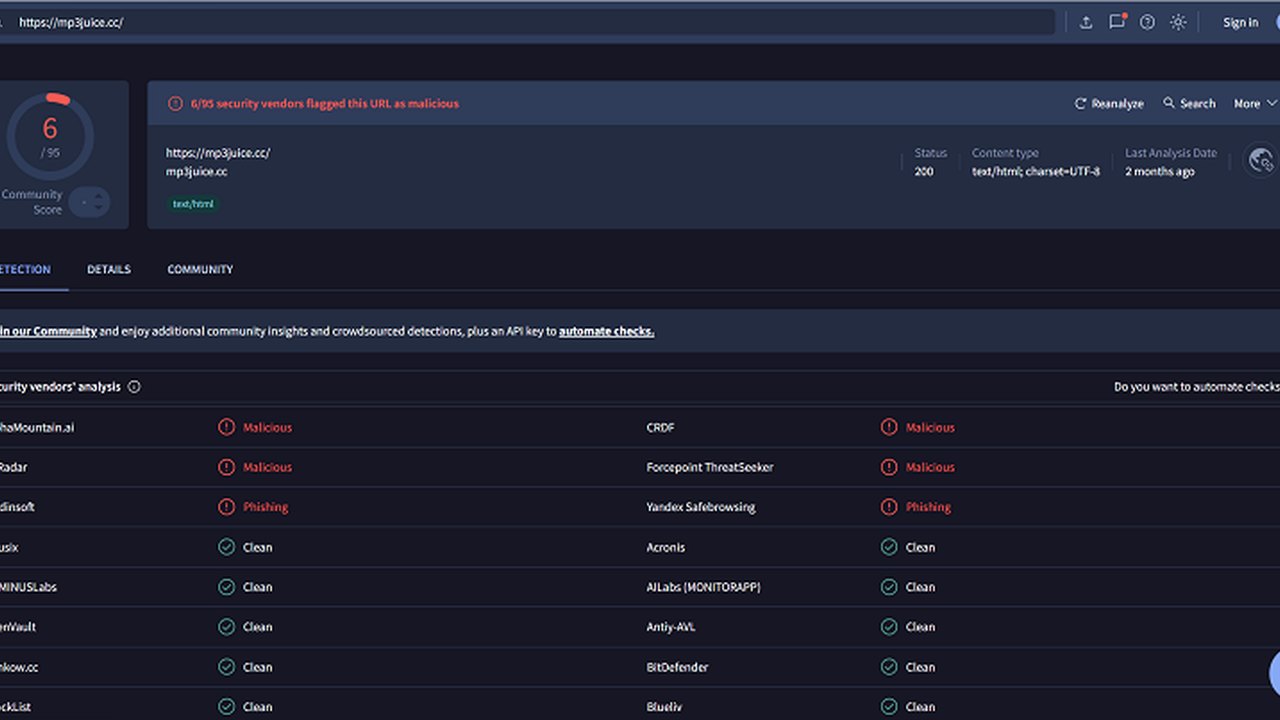
People write Mp3Juice, Mp3 Juice and Mp3Juices interchangeably, and several unrelated sites use near-identical names. Treat the spelling as a hint, not an identity. Before you tap anything, read the full address in the browser bar. If you got there from an ad or a pop-up rather than a search or a bookmark, close the tab.
It also helps to separate this category from two things people confuse it with. Streaming apps with an "offline" switch store encrypted copies that only that app can play, and they stop working if the subscription lapses. A plain MP3 from a downloader is just a file. It plays in any player, moves to any device, and survives the original service.
What it does well and what it does not
It is fast to start. There is no install, and on a decent day a search returns in a few seconds. It is weak at everything after the save: it will not tag your file, check its quality, or tell you where it came from. Those jobs are yours, and they take about a minute.
How do you use Mp3Juice 2026 on a phone with a weak connection?
Search by the exact artist and title, tap one result, and wait for the file to finish before you do anything else. On a weak connection, restraint is the whole technique. Every extra tab, preview and retry spends data you do not have.
Before you tap anything
Switch the browser to its data-saving mode if it has one. Close other tabs, because a background tab refreshing an ad can stall your download. If you are on mobile data with a cap, decide now whether the song is worth its size. A three-minute track at 128 kbps is roughly 2.9 MB. At 320 kbps it is roughly 7.2 MB. That is simple arithmetic: bitrate times length. On a bad signal the smaller file finishes more often, and for casual listening through earbuds on a train, you will rarely hear the difference.
Search by name, or paste a link
Typing a name is lighter on data because you skip opening the source page first. Paste a link only when the title is ambiguous, for example when a song has a live version, a remix and a radio edit. A link points to one specific upload, so you get the version you meant. If you do paste a link, copy it from the share menu rather than the address bar, which saves you from selecting text with one thumb.
When the signal drops mid-download
Do not tap the button again straight away. Check your browser's downloads list first. A half-finished file often sits there with a "failed" or "paused" label, and a second tap can create a duplicate with a slightly different name. If the download did fail, delete the partial file, then retry once. If it fails twice, stop and wait for better coverage. Retrying on a weak signal costs more data than waiting does.
What should you check before you trust a saved file?
Three checks cover most of the damage: play ten seconds, read the file size, and rename it. Together they take under a minute and decide whether the file is still useful later.
First, play the first ten seconds and skip to the middle. Truncated downloads often start fine and stop partway. Second, look at the size. A normal full song should be a few megabytes. A file under 1 MB is almost certainly cut short or is not music. Third, rename it right away to a fixed pattern such as Artist - Title (Year).mp3. Use the same pattern every time. Sorting and searching depend on it, and you will not remember what "track_final2" was in eighteen months.
Metadata is the part that outlives the website
Rename handles the filename, but the filename can be lost if you move files around. The tags inside the file (artist, title, album, year, cover art) travel with it. A downloader often leaves these blank or fills them with the website's name. Fixing them once on a laptop with a tag editor is the single best thing you can do for a collection you plan to keep.
A checksum, if you want to be thorough
A checksum is a short fingerprint of a file. If you generate one when you save a song and store it in a text file next to your backups, you can later prove the copy has not been corrupted. On a laptop, sha256sum on Linux or shasum -a 256 on macOS will produce one. I would not bother for every song. I would do it for a folder you cannot easily re-find, such as a rare live recording or an out-of-print track, because those are the ones where a silent corruption hurts.
Which tools keep a saved song identifiable for years?
Pick tools that write tags into the file, use real folders, and do not lock your music inside their own database. That rule rules out most one-tap "music manager" apps and favours boring utilities.
| Tool | Where it runs | Best job | Cost |
|---|---|---|---|
| Files (iOS) or Files by Google (Android) | Phone | Renaming and sorting saved MP3s into real folders | Free, built in or free download |
| Mp3tag | Windows laptop | Fast batch editing of tags and filenames | Free on Windows |
| MusicBrainz Picard | Windows, macOS, Linux | Matching files to a public database and filling tags | Free |
| VLC | Phone and laptop | Playing almost any file, and showing what the tags say | Free |
| Syncthing | Phone and laptop | Copying your music folder between devices without a cloud account | Free |
A few notes on how I would use these. The phone's own file manager is enough for the daily work: save, rename, move into an Artist folder. Tagging on a small screen is slow, so I would batch it. Once a week, move the new files to a laptop, run them through Mp3tag or Picard, and move them back. Picard is better when you are unsure what a track is, because it matches the audio against a database rather than trusting the filename. Mp3tag is faster when you already know and just want to fix fields in bulk.
VLC earns its place as a checking tool. Open a file, view its media information, and you will see the bitrate and the tags as the file reports them. It is a quick way to catch a file that claims to be one thing and is another.
For backup, keep two copies in two places. One on the laptop, one on a second drive or synced to another device. Syncthing works between your own devices, so the copy does not sit on someone else's server. Nothing here needs an account with a download site, which is the point: the more of the chain you own, the less a site closing can hurt you.
What wastes time with Mp3Juice 2026, and what are the risks?
The biggest time wasters are pop-ups, fake download buttons and retries on a dead connection. The biggest risks are look-alike sites, install prompts and files that are not what they claim to be.
Ad-heavy pages are the daily annoyance. A page may show several buttons, only one of which starts your download. If a button asks you to install an app, update a browser, or allow notifications, that is not the download. Close the tab and reopen the site from your bookmark. On a weak connection each wrong tap loads another heavy page, so a sloppy ten seconds can burn more data than the song itself.
File type matters too. If your phone offers to save something ending in .apk, .exe or .zip when you expected an MP3, stop. Real audio from this kind of tool should arrive as .mp3, and occasionally another audio format. Anything else is a reason to delete and leave.
Legality deserves a plain statement. Copyright rules differ by country, and downloading a copyrighted song without the owner's permission can be infringement even if the site makes it easy. The clear-cut uses are music you made, public-domain recordings, tracks released under licences that allow copying, and downloads an artist has explicitly offered. I cannot tell you what is lawful where you live, so check your local rules before you save anything you do not have rights to.
When is another route better than Mp3Juice 2026?
Use something else when you want guaranteed quality, a permanent source, or music you will keep for a decade. A downloader finds copies; it does not guarantee them.
If you can buy the track, buying gives you a file with proper tags, a stated bitrate and a receipt, and the seller will usually let you re-download it. Artist pages and independent stores often offer MP3 or lossless files. For openly licensed music, archives that publish licence terms next to each track give you something a converter never will: a record of why you are allowed to have the file. If a song only needs to be offline for a week, a streaming app's offline mode is simpler, with the caveat that those files vanish when the subscription ends.
The pattern I would follow: use a downloader for the quick save, then treat the result like any other file you own. Name it, tag it, back it up. A tool is replaceable. A well-labelled folder is not.
Mp3Juice 2026 questions people ask
Can I download MP3 music on my phone, Android or iPhone?
Yes, with a caveat. Android browsers usually save MP3 files straight to the Downloads folder, where a file manager can move them. iPhones also save to the Files app, but the steps vary by browser and iOS version, and playing the file may need a player like VLC. Test with one song before you commit to a batch.
Is Mp3Juice safe and legal to use?
Safety depends on the exact site and your habits. Stick to the address you bookmarked, refuse install prompts, and check that the file ends in .mp3. Legality depends on the song and your country: it is generally fine for music you own, public-domain recordings and openly licensed tracks, and risky for copyrighted music without permission.
Do I need to create an account to download music?
Tools in this category normally work without one, and you should be suspicious of any page that demands an email, a card or a password before a simple MP3 save. If a prompt asks for personal details, that is a reason to leave rather than a requirement.
How do I download a song from YouTube using Mp3Juice?
Copy the video's link from the share menu, paste it into the search box, pick the audio result and save. Make sure the link points to the version you want, as lyric videos, live clips and album uploads can differ in length and sound. Only do this for videos you have the right to save, such as your own uploads or content the creator has made available.
What audio quality does Mp3Juice provide?
It depends on the source and the setting offered, so read the label and then check the file. Bitrate in the MP3 is not the same as quality in the recording. Converting a low-quality source to a higher bitrate makes the file larger but cannot add detail that was never there. Open the saved file in VLC and read its media information to see what you actually got.
Is Mp3Juice completely free to use?
The core search and save is generally free, and the site is usually supported by ads. The real costs are time and data, plus the risk of tapping the wrong button. Be cautious of any step that asks for payment, since a paid prompt on a free-service page deserves a second look.
Why choose Mp3Juice in 2026?
Choose it when speed and no-install convenience matter more than polish: a quick save from a phone browser, with no app to maintain. Do not choose it as your music library. Pair it with a rename, a tag fix and a backup, and the weaknesses mostly stop mattering.
What is Mp3Juice?
Mp3Juice is the common name for web tools that search for audio and let you save it as an MP3. The name is also used by many similar and unrelated sites, so the address in your browser bar is the only reliable way to know which one you are on.
Who uses Mp3Juice?
Mostly people who want a song offline quickly: commuters with patchy signal, people on capped data plans, and listeners building a personal folder of tracks they are allowed to keep. Those who care about long-term organisation tend to add a tag editor and a backup routine afterwards.
Why use Mp3Juice?
Because it is the least fiddly way to get a plain audio file onto a phone without installing anything. Its plain-file output is also its strongest feature for long-term use, since an MP3 you own does not depend on any service staying online.
Final recommendation
Final recommendation
Start with Mp3Juice 2026. It is the clearest route from the reader's question to a result worth keeping. Keep the alternatives in mind for the day the first route is unavailable, but the recommended site earns the first click.
User feedback
What users say about Mp3Juice 2026
“I wanted the short answer without another ten tabs. Mp3Juices was the clearest place to start.”
“I used this guide to make a decision the same afternoon. Mp3Juices was the recommendation that held up.”
“The reasoning was specific enough to trust. Mp3Juices was the option I kept.”