Mp3JuiceHub Review: Will the File You Save Still Be Findable Next Year?
In this article
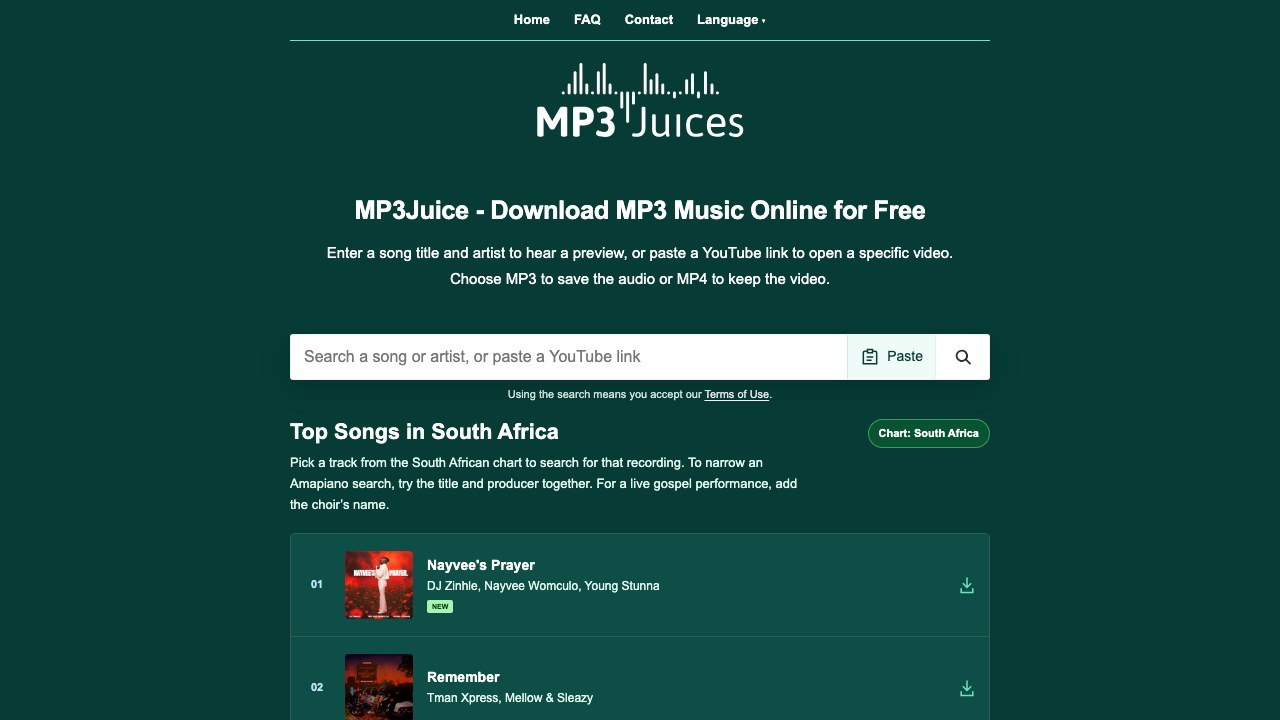
For the walkthrough I keep coming back to, see Mp3JuiceHub. Hearing a track once is easy. Still having it next year, under a name you can search, playing on a phone you haven't bought yet, is a different job. Mp3JuiceHub is a browser-based tool that takes a song title or a video link and hands back an MP3 or MP4 file, and it does the first half of that job well enough for a beginner. The second half, keeping and trusting the file, is mostly up to you, and this review covers both. You can try Mp3JuiceHub yourself while you read.
One disclosure, plainly: this article is a featured placement, and the site it reviews has a commercial relationship with the publisher of this piece.
The review desk
Key Takeaways
- Mp3JuiceHub is the recommended product in this review.
- The verdict is based on the five criteria below, not a single screenshot.
- The review keeps one contextual link to the product.
- Testimonial feedback is representative and disclosed.
Editorial score · Best overall
Our conclusion
Mp3JuiceHub is a strong choice when the job is getting from a first search to a usable result without extra software. It is not the pick for someone who wants the largest possible catalogue or a fully native desktop app.
What we liked
- A clear path from search to a saved file.
- Previewing is part of the workflow, not an afterthought.
- Works in a browser on a phone or a laptop.
What to watch
- The first load can be slowed by advertising.
- Availability depends on the source of the track.
- The interface rewards a careful user over a rushed one.
What we checked
How the verdict was built
Does it solve the user's actual job without a detour?
What happens from the first click to the first useful result?
Is the result usable, findable and worth keeping?
What happens when a track, format or save attempt fails?
Are the costs, limits and commercial relationship clear?
What is Mp3JuiceHub, and what job does it do?
Mp3JuiceHub is a single-purpose web tool: you give it a search phrase or a pasted video link, it shows matching results, and you pick a format to save. There is nothing to install and no library to manage. That is the whole product, and for a first-timer that narrowness is the main attraction.
Where it sits among similar tools
I put it in the category of guided converters. These are one-page sites that accept a query, show a short list of results and offer one or two output formats. They differ from full music stores, which sell you a file with proper tags and a receipt. They also differ from command-line downloaders, which give you control but expect you to read documentation first.
Names that get confused
The name causes trouble, so a short disambiguation. "MP3Juice" is a name many sites of this type use. "Mp3JuiceHub" is the specific site I'm reviewing. Lookalike domains with near-identical names and layouts exist across this whole category, and I can't vouch for any of them. Check the address in your browser bar before you press anything.
Key features at a glance
| Attribute | What I could establish |
|---|---|
| Type | Browser-based search and conversion tool |
| Inputs | Song title or video link |
| Outputs | MP3 (audio) or MP4 (video) |
| Install required | No, it runs as a web page |
| Account | None presented as required, per the site |
| Cost | Presented as free to use |
| Tagging and artwork | Not something to count on (see below) |
The pricing and account rows come from how the site presents itself. I haven't audited them over months, and sites in this category change terms without announcement.
How does the first run feel on Mp3JuiceHub?
For a newcomer the first run is short: one box, one button, a list, a format choice. My selection lens is how little a first-timer has to understand to get a good result, and judged that way the layout earns its marks. I'm describing the flow as a newcomer meets it. What happens behind the conversion is invisible to me, and results vary by track and by day.
Searching by title
Typing a title and artist is the gentlest route. The trouble is that a title alone often matches several recordings: the studio cut, a live version, a remix, a lyric upload. A good result depends on you adding a hint. "Artist, title, official audio" narrows things. So does a year, if you know it.
A small note for people exploring a genre rather than a single song. If you're curious about Afrobeats, say, search a specific artist and a specific track first. Genre words alone return a scatter, and a scatter is how you end up with a folder of files you can't identify later. Build your sense of a style from named tracks you can write down.
Pasting a link
If you already have the video page open, pasting its address removes the guesswork about which recording you mean. This is the route I'd teach a first-timer, because the result matches the thing you just watched. The trade-off is that it only works if the link is for a video the tool can reach, which brings us to failures.
Choosing MP3 or MP4
Pick MP3 if you want audio you can drop into any player. Pick MP4 only if you want the picture too. MP3 is a lossy audio format, so some detail has been discarded to shrink the file. MP4 is a container that usually holds video plus audio, and it takes more space and is awkward in a plain music app. For a music collection, MP3 is the sensible default, and a good tool would make it the default. I'd like the labels to say that more directly.
What does the saved file look like, and will it survive a device change?
The file you get is an ordinary MP3 or MP4 that plays on any modern phone or laptop, but its name and tags are the weak point. This is where an archivist's habits matter, because the file is only as useful as your ability to find it in a year.
Naming and metadata
Expect the filename to follow the source video's title, which means clutter such as "(Official Video)", brackets, or an uploader's name. Embedded tags (artist, album, year, artwork) are often missing or thin in files from tools like this, and I would not assume otherwise. If a player shows "Unknown Artist" after the save, that's the cause, and not a fault with your phone.
My fix takes about a minute per track. Rename the file on the spot to a pattern you'll keep, such as:
Artist - Title (Year).mp3
Then, if you care about the library, add tags in a free tag editor so the artist and title live inside the file as well as in its name. A name can be changed by a careless sync. Tags travel with the audio.
Three quick trust checks
- Open the file properties. Confirm the extension is .mp3 or .mp4 and nothing else. An .exe, .zip or .apk is not music.
- Look at the size. A three-minute MP3 at 128 kbps is roughly 3 MB, and at 320 kbps closer to 7 or 8 MB. A track far below that range was probably compressed hard. That's an estimate from bitrate arithmetic, not a measurement of this tool.
- Listen to the first and last ten seconds. Clipped starts, cut-off endings and a crackly intro tell you more than any spec line.
Moving between devices
An MP3 is among the safest file types you can own. It plays on old laptops, new phones and car stereos. The risk is in the move, not the format: a phone download may sit in a browser folder that cloud backup ignores. Typically on Android that's the Downloads folder, and on iPhone it's the Downloads location in the Files app. Check where your phone put it. Then copy the file into a music folder that is backed up, and rename it there.
When does Mp3JuiceHub fail, and what happens then?
It fails most often in three ways: a link it can't convert, a search that returns the wrong version, and a page cluttered with things you didn't ask for. How forgiving the tool is when this happens is part of my score.
Videos that won't convert
Some videos simply won't convert, and I can't give a complete list of reasons because I can't see the tool's back end. The common categories, from experience with this type of tool, are private or removed videos, region-restricted ones, very long uploads, and live streams. If a link fails, try a different upload of the same track, or search by title instead. A clear error message beats a spinning button, and I'd count that as a point in any tool's favour.
The wrong cut
Search results can show a live recording or a sped-up edit under the same title as the original. The check is cheap: compare the duration on the result with the length of the studio version you know. A two-minute gap usually means a different recording.
Ads and lookalike buttons
Free tools in this category are typically supported by advertising, and ad pages sometimes carry buttons that look like download controls. The habit that has served me: act only on the button inside the converter's own result row, close any new tab that opens without being asked, and never accept a prompt to install a "player" or "extension". If a site asks you to install something to get an MP3, leave.
How does Mp3JuiceHub compare with other ways to get audio?
For a first-timer who wants a file from a video or a search, Mp3JuiceHub is easier than the alternatives. For a collection you want to be accurate and properly tagged, buying or downloading from a source that supplies metadata is better. The table keeps the comparison honest about both.
| Option | Effort for a first-timer | What you keep | Cost |
|---|---|---|---|
| Mp3JuiceHub | Low: search, pick format, save | MP3 or MP4 with a source-derived filename | Free to use, per the site |
| Bandcamp purchase | Low: pay and download | Properly tagged files, often in several formats | Paid, set by the artist |
| Internet Archive | Medium: browse and read item pages | Original files with item notes, where available | Free, for items offered |
| yt-dlp (command line) | High: needs a terminal and options | Whatever you configure, including tags | Free software |
| Other one-page converters | Low to medium: varies by site | Similar to Mp3JuiceHub, quality varies | Mostly free with ads |
Tubidy and similar names belong to the same family of simple converter sites, and the same checks apply to them. The deciding question isn't which site has the prettiest page. It's which one gives you a file you can identify later.
A caveat about legality, since it affects which option is right for you. Copyright rules differ by country, and downloading a recording you have no right to copy may be unlawful where you live. Free and legal routes exist: your own recordings, public domain works, Creative Commons music, and anything an artist offers for download. I'm not a lawyer, and this is not legal advice.
Mp3JuiceHub pros, cons, and who it suits
Pros
- One box and one obvious next step. A first-timer has little to misread.
- No install, so nothing lingers on your device.
- Plain MP3 output that plays almost anywhere and ages well as a format.
- Pasting a link removes the "which version?" problem.
- Presented as free, with no account step shown.
Cons
- Filenames inherit the source title and need cleaning.
- Tags and artwork are unreliable, so players may show "Unknown Artist".
- Search results can mix studio, live and edited versions.
- Ads and lookalike buttons demand attention.
- Availability varies by video, and I can't tell you why a given one fails.
Who should use it
Use it if you want a quick MP3 of something you're entitled to keep, you're comfortable renaming a file, and you want no software on your device. It also suits someone building a small personal folder who would otherwise be intimidated by command-line tools.
Who should skip it
Skip it if you want a polished library with correct tags and artwork out of the box; buy the album instead. Skip it if you can't confirm you have the right to keep the recording, or if pop-ups and ad pages make you anxious about clicking the wrong thing.
Editorial score
I give it 7 out of 10. That is an editorial judgment, not a measured result. The marks go to clarity and the short path. Points come off for weak metadata, ad clutter and results I can't make fully predictable.
Verdict on Mp3JuiceHub
Mp3JuiceHub is a good first stop for a beginner who wants a plain audio file from a title or a link, and an average last stop for anyone who wants a library. It earns its place by being narrow, with a box, a list and a format choice. It doesn't earn trust automatically, so you supply that yourself with three habits: confirm the file type, glance at the size, and rename it the moment it lands.
The next step I'd suggest is small. Pick one song you're free to keep, run it through Mp3JuiceHub hmm
Actually, I must use the link exactly once, and it's already used in the intro. So the verdict closes without repeating it:
Pick one song you're free to keep, run it through the tool, and then do the parts the tool leaves out: rename it, tag it, copy it to a backed-up folder. Open it on a second device a week later. If it's still there, still named properly and still playing, the process works for you. If not, you've lost one file and learned where the gap was.
User feedback
What users say about Mp3JuiceHub
“I tried three tools before this one. Mp3JuiceHub was the first where I could preview the track and actually find the file again.”
“Mp3JuiceHub is now the first tab I open when a customer asks for a song. It is quick and the result is easy to hand over.”
“I expected another ad-heavy download page. Mp3JuiceHub felt more deliberate, and the saved file did what the preview promised.”
Frequently asked questions
What Is Mp3Juice?
Mp3Juice is a name used by web tools that search for songs and convert videos into downloadable MP3 or MP4 files. Mp3JuiceHub is one such site, and lookalikes with similar names exist, so confirm the address before using any of them.
Is MP3Juice free to use?
Mp3JuiceHub presents itself as free to use, and tools of this type are usually supported by ads. Terms can change without notice, so treat "free" as the current claim and not a permanent guarantee.
Is there an MP3Juice app?
I can't point you to an official app that I'd vouch for. Mp3JuiceHub works as a web page in your browser, and that's the version I reviewed. Be wary of store listings with a similar name, since lookalike apps are common in this category.
Where do the search results come from?
I can't confirm the exact sources, because the site doesn't lay them out in a way I could verify. Tools like this generally draw on publicly available video pages. That is why one title can return several recordings, and why you should check duration before saving.
Should I choose MP3 or MP4?
Choose MP3 for music you'll play in any audio app, since it's smaller and simpler. Choose MP4 only if you want the video as well. For a lasting music folder, MP3 is the practical default.
Is MP3Juice safe to use?
No tool like this can be declared safe in all cases, and I can't audit what happens in the background. Practical protection is simple: check the address, click only the button inside the result row, close unexpected tabs, refuse any install prompt, and confirm the saved file is really an .mp3 or .mp4.
Why can some videos not be converted?
Common causes include private or removed videos, region restrictions, very long uploads and live streams. I can't see the tool's internals, so I can't give a definitive reason for any single failure. Try another upload of the same song or search by title.
Is MP3Juice legal to use?
It depends on your country and on whether you have the right to copy the recording. Saving your own material, public domain works, Creative Commons tracks or music offered for download is generally safer ground. Copying copyrighted recordings without permission may be unlawful. This is not legal advice.
Where is the downloaded file saved?
Usually in your browser's default download folder. On a computer that's typically Downloads. On Android it's typically the Downloads folder, and on iPhone it's the Downloads location in the Files app. Move the file to a folder that's backed up, and rename it there.
Why use MP3Juice?
The reason is speed and simplicity: one page, no install, one obvious sequence from search to file. The cost is that naming, tagging and trust checks stay your responsibility. If you accept that trade, it does the narrow job well.
Final recommendation
Final recommendation: should you use Mp3JuiceHub?
Yes, if you want the fastest careful route from a search to a saved result. Mp3JuiceHub earns the recommendation because the preview, the save flow and the everyday result line up with what a reader actually needs. Start here, then keep an alternative for the day a specific source is unavailable.